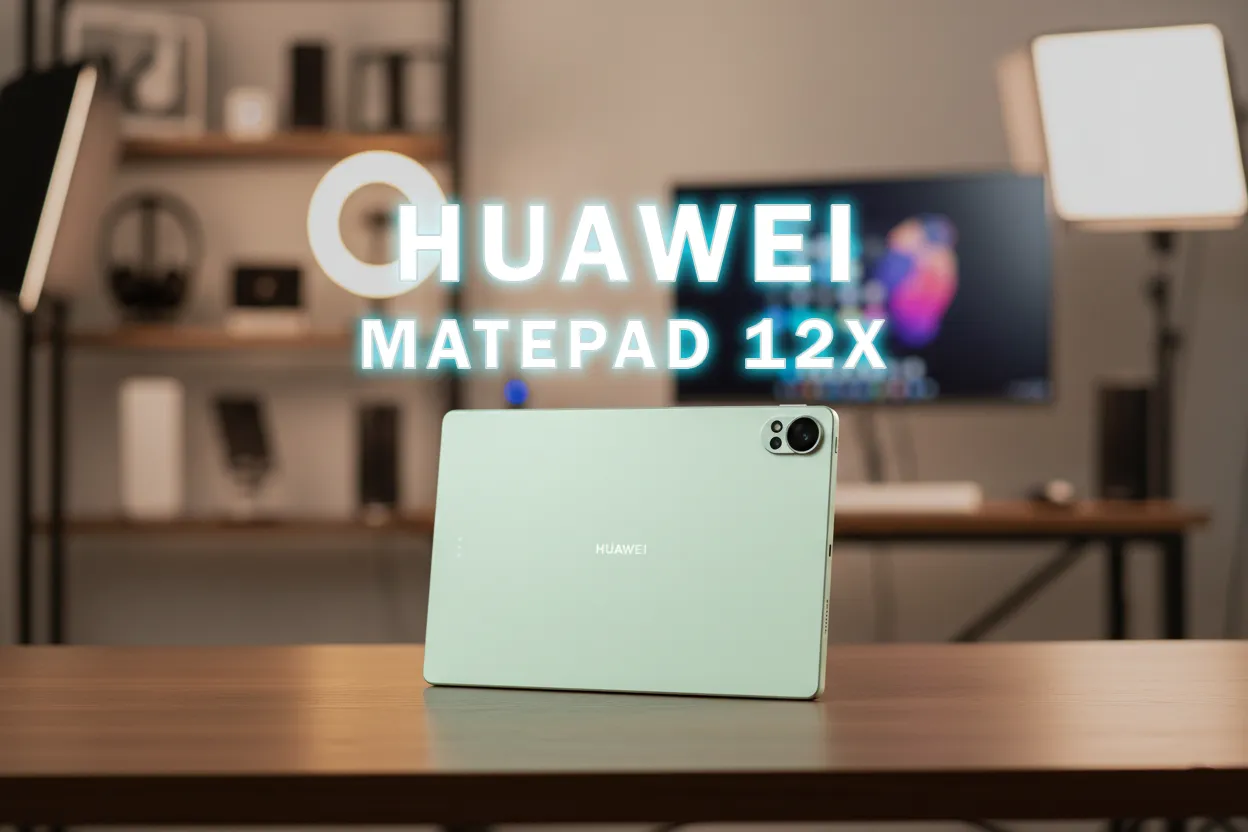

Brief Product Profile (for readers who want a quick understanding)
- Category: 12-inch productivity tablet, HarmonyOS 4.3
- Product Position: Above MatePad 11.5, below MatePad Pro 12.2 inches
- Accessories: Bundled keyboard; M-Pencil Pro available and included in first sale packages at certain times
- Target Users: Mobile workers, students, light sketch creators
- Review Focus: Anti-glare matte screen, WPS Office 3.0 “PC-level”, daily performance, application ecosystem
Reviewer’s Brief Conclusion: Excellent for Mobile Work
Most reviewers agree that this tablet excels in productivity: WPS Office 3.0 feels like a desktop, the keyboard is comfortable, the new high-precision stylus, and the matte screen is glare-free. Daily performance is smooth; casual-heavy games still run, although it is not a gaming tablet. Key notes include access to Google services remaining via alternative solutions, as well as external monitor and application compatibility that needs to be checked on a case-by-case basis. The bundled package makes the value appear strong compared to the iPad Air when focusing on document work.
Market Position: A Tablet Approaching Light Laptop Experience
The 10–13 inch tablet segment is becoming increasingly competitive. This product is positioned as an alternative “super light laptop” for document work and meetings, bridging the needs of offices/schools that require a keyboard, trackpad/mouse, stylus, and complete office applications. Common comparisons arise against the iPad Air (mature application ecosystem) and mid-range Androids that excel in price but lack such deep productivity software.
Consensus Among Indonesian Reviewers: Key Points to Know
This article summarizes findings from various Indonesian reviewers so that readers can quickly grasp the consensus and differences.
Design & Build Quality
Many rate it as premium, thin-light, and neat. The package with the keyboard gives an impression of “ready to work” right out of the box.
Anti-Glare Matte Screen
The main highlight. The 12-inch IPS panel with anti-glare matte lamination is considered effective in reducing reflections without excessive “sparkle.” The high refresh rate makes navigation and stylus feel smooth. There is eye comfort certification appreciated during long use.
WPS Office 3.0 (Main Differentiator)
This is the differentiator. The toolbar and layout resemble a desktop, supporting many Office formats, complex formulas, charts, and even cloud synchronization. Some reviewers mention the “PC-level” experience is the closest in the non-Windows tablet class today.
Keyboard & M-Pencil Pro
The keyboard is rated stable and comfortable; the support angle is flexible. The new stylus is appreciated for its sensitivity, replaceable tip, and gestures that assist sketching/note-taking workflows.
Performance & Software Experience
For daily work, light-medium multitasking, and meetings, its performance is rated smooth. Opinions differ on heavy gaming: some consider Genshin/set heavy still playable, while others suggest moderate expectations.
Application Ecosystem & Google Services
AppGallery includes many popular applications; for Google services, some reviewers find it smooth via third-party solutions (e.g., GBox), but there remains additional effort and potential limitations on notifications/certain DRM that need verification application by application.
Battery, Audio, Camera & Connectivity
Battery life is positively highlighted for work and multimedia consumption, with practical fast charging. The weight remains manageable despite the large battery. Audio is adequate for online meetings; display output via USB-C is appreciated, although external monitor experiences can vary across applications.
Main Advantages According to Most Reviewers
- Comfortable anti-glare matte screen for long use, minimal reflections.
- WPS Office 3.0 with a desktop-like experience, strong for Word/Excel/PPT.
- Bundled keyboard package and support for M-Pencil Pro enhance value.
- Smooth daily performance, interface animations feel responsive.
- Large battery with fast charging, suitable for mobile use all day.
Most Commonly Noted Disadvantages
- Access to Google services is not native; installation via alternative solutions requires additional steps and is not always perfect.
- Heavy gaming is not the focus; stable performance can vary across games and graphic settings.
- Third-party creative application ecosystem is not as deep as the iPad; some pro workflows require adjustments.
- Dependence on pogo-pin accessories: the keyboard cannot be used separately via Bluetooth.
- Availability of applications like GoPaint may vary by region/sku.
GizmoKita Insight: Who Benefits Most?
Recommended For
Office workers/entrepreneurs/students whose priorities are typing, data processing, presentations, online meetings, and note-taking/sketching. Users sensitive to screen glare will find it very helpful.
Less Ideal For
Heavy gamers seeking stable frame rates at high settings; users who require native Google services without compromise; professional creators relying on exclusive iPad applications.
Trade-offs to Consider Before Buying
Strong bundling value and productivity vs. application ecosystem and Google services requiring alternative solutions. If documents/meetings are the core workflow, plus a comfortable matte screen, the compromise feels worth it.
GizmoKita Verdict: Buy Now or Wait?
If your priority is document work, note-taking, presentations, and meetings in a lightweight package with a ready-to-use keyboard and stylus, this is worth buying. If native Google ecosystem and pro-level creative applications are primary requirements, consider other options or ensure your workflow runs smoothly through alternative solutions before deciding.
Worthwhile Alternatives to Consider
- Apple iPad Air (M2/M3): Mature creative application ecosystem, smooth Google and DRM access; separate accessories increase costs.
- Samsung Galaxy Tab S9 FE: Android with S Pen support, water/dust resistant, Galaxy ecosystem; performance and screen have different characteristics.
- Huawei MatePad 11.5 (latest): More affordable with a focus on productivity, smaller screen, simpler features.
Conclusion
GizmoKita summarizes opinions from many reviewers to help make purchasing decisions faster and more accurate—without having to watch lengthy videos. Save this article as a reference before checkout.
FAQ
Is the Huawei MatePad 12X 2026 worth buying?
Worth it for daily productivity thanks to WPS Office 3.0, keyboard, and stylus. Less ideal if you need native Google services and pro-level creative applications.
Can this tablet replace a laptop?
For document work, presentations, and online meetings—it can. For specific desktop applications or heavy compilations—it’s better to stick with a laptop.
Who is it suitable for?
Mobile workers, students, and users wanting a comfortable matte screen, intensive typing, and sketching/notes with a stylus.
How does it compare to the iPad Air?
The iPad Air excels in application ecosystem and Google/DRM support; this product excels in bundling value and “PC-level” WPS. Choose according to your workflow.
Can YouTube/Netflix and Gmail run?
Many reviewers use via AppGallery/GBox with good smoothness, but experiences can vary; check your application needs first.
Source:Bestindotech